
“Human-in-the-loop” is often implemented as a button that says Approve. The agent proposes something, the person clicks once, and the system proceeds. It looks responsible in a diagram. In production, it can become a ritual that people perform without reading.
The problem is not that humans are careless. It is that a generic approval request asks for too much trust with too little context. If the same person sees fifty prompts that all say “approve agent action,” the safest behavior becomes clicking through them.
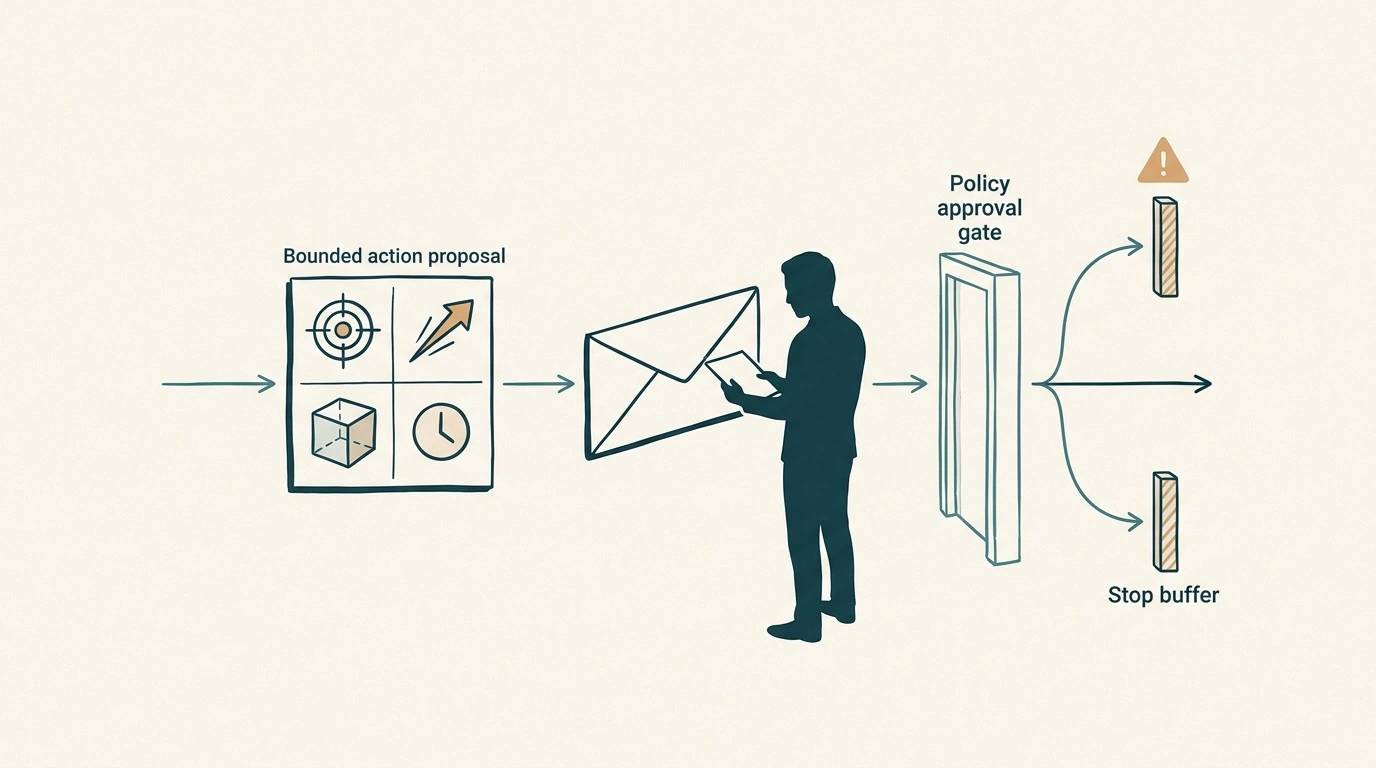
A useful human gate is not a pause in the workflow. It is a decision boundary. The reviewer should understand what will happen, to which target, with which authority, and for how long the approval remains valid.
Why the generic approve button fails
A generic approval hides the object of consent. It may not show the exact arguments, the source of the data, the external side effect, or the difference between a draft and an irreversible action.
It also creates a false sense of safety. The presence of a human click does not prove that the human understood the action. If the agent changes the amount, destination, tenant, or tool after the click, the approval may no longer refer to what is executed.
A better design starts with a bounded action envelope:
{
  "effect": "send_email",
  "recipient": "finance@example.com",
  "subject": "Refund summary for order 4821",
  "attachments": ["refund-summary.pdf"],
  "data_classification": "internal",
  "risk": "medium",
  "requested_by": "support-agent",
  "expires_at": "2026-08-14T10:15:00Z"
}
The approval should bind to this exact envelope. If the recipient or attachment changes, the action must return to policy evaluation.
Risk should determine the amount of friction
Not every action deserves the same approval experience. Asking a human to approve every read-only lookup creates noise. Never asking for approval before a high-impact transfer is reckless.
A risk tier can make the rule explicit:
| Tier | Example effect | Default control |
|---|---|---|
| Low | Read public documentation, calculate a draft | Automatic under policy |
| Medium | Create a draft, update a non-critical record | Policy check, optional review |
| High | Send an external message, change permissions | Explicit contextual approval |
| Critical | Transfer money, delete data, cross a tenant boundary | Strong approval, fresh identity, possibly two people |
The tier should describe the effect, not the model’s confidence. A confident model can still be wrong. A low-confidence read may be harmless, while a high-confidence delete remains high impact.
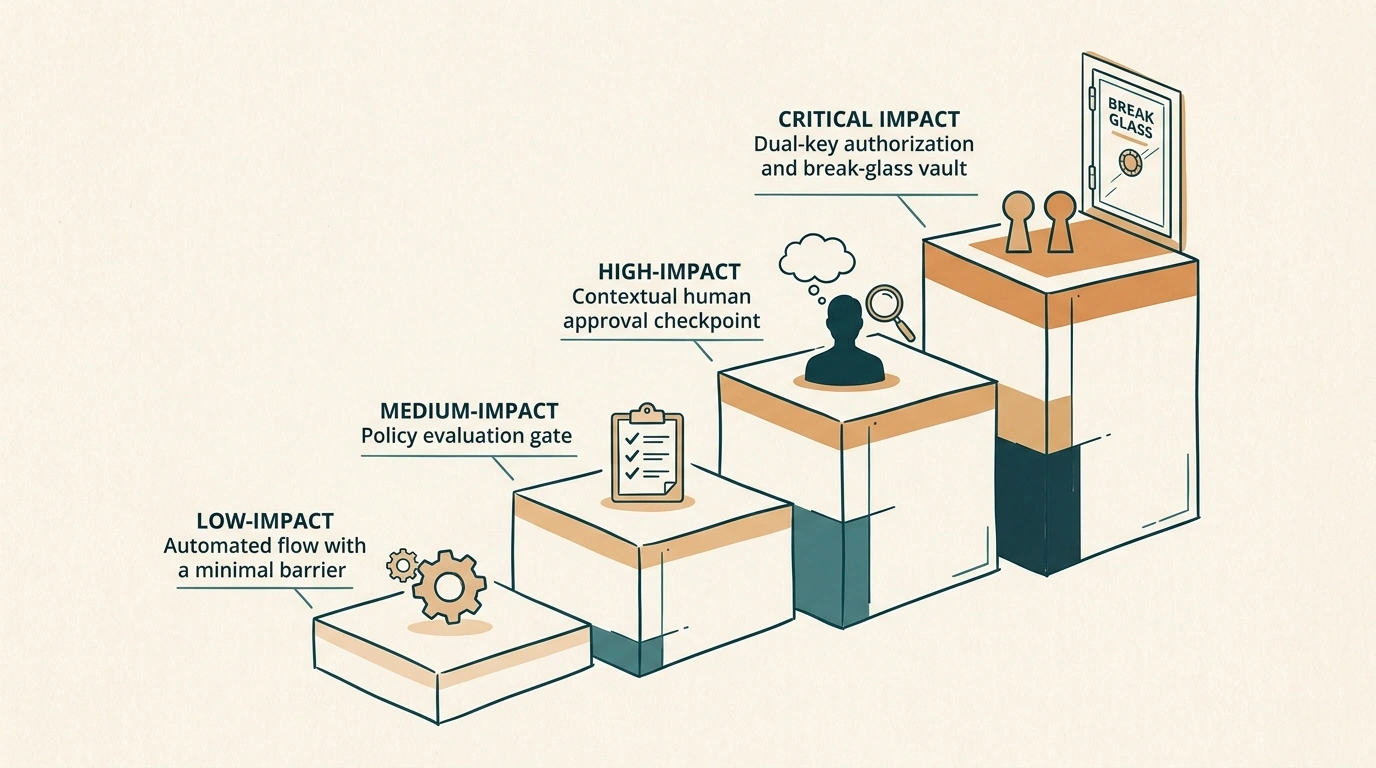
Risk should also consider the target, data classification, reversibility, blast radius, and whether the action is new for this user or tenant. The same tool can be low risk in one context and critical in another.
Show the decision, not the whole transcript
A reviewer does not need to read an entire agent trace. They do need a compact decision view that answers the relevant questions.
The preview should show the intended effect, the exact target, the normalized arguments, the identity used, the data that will leave the system, the policy reason, the expiry, and what will happen if the action fails. If the action is a change, show a diff. If it is a message, show the final body and recipients. If it is a delete, show the affected records and recovery path.
This is a design challenge, not merely a UI problem. The agent should create a structured proposal that the gate can render consistently. A prose explanation generated after the fact is not enough because prose can omit a dangerous argument.
The same principle applies to MCP capabilities. A tool description can help the model plan, but the human should approve a concrete action envelope, not a vague promise that a tool is safe.
Approval freshness matters
An approval is a statement about context. If the context changes, the statement may no longer be valid.
Define an approval digest from the action envelope, actor, tenant, policy version, and relevant evidence. Store the digest with the approval. At execution time, recompute it. If the digest differs, require a new decision.
approval_digest = hash(
  action,
  normalized_arguments,
  target,
  actor,
  tenant,
  policy_version,
  evidence_version
)
Add an expiry. A person may approve a $42 refund while the order is in one state, but a delayed retry may execute after the order has changed. Short-lived approval is safer than treating a click as a permanent permission.
Freshness should not be an arbitrary timeout alone. High-impact actions may require revalidation when the target state changes, even if the original approval has not expired.
Batch approvals can reduce fatigue without hiding risk
Consent fatigue does not mean every approval should be removed. It means the system should group similar low-risk decisions and keep high-risk actions visible.
A batch approval can be appropriate when the scope is precise: “send these twelve pre-approved notifications to recipients in this campaign, using this template, before 17:00.” It is not appropriate for “approve all actions the agent wants to take this afternoon.”
A batch envelope should include a maximum count, allowed action type, target set, data class, time window, and stop condition. The reviewer must be able to inspect samples and reject the batch without losing the audit trail.
Escalation should be a designed path
When the first reviewer cannot decide, the agent should not simply ask again with more urgency. It should escalate with the missing context, the policy reason, and the next authority required.
A good escalation path can include:
- clarification from the user when the request is ambiguous;
- review by an operator with the right tenant or data scope;
- dual approval for critical effects;
- a time-bound break-glass path for emergencies;
- a safe partial completion when the action cannot be approved.
The reviewer should never be pressured by artificial countdowns that hide the consequence of waiting. A timeout should produce a safe state such as not_executed or expired, not an implicit approval.
Break-glass is not a shortcut around accountability
Emergency access can be necessary. It should also be more visible than normal access, not less.
A break-glass action should require a reason, an identified actor, a narrow scope, a short expiry, and stronger telemetry. If a second person cannot approve in time, the system can record that fact and require retrospective review. The emergency path should not silently disable policy or erase the evidence that it was used.
This is especially important when an agent can access customer data or external systems. The emergency path should specify what it can do, what it cannot do, and how the organization will detect misuse.
Measure the quality of the gate
The approval workflow needs its own metrics. A high approval rate does not necessarily mean the system is trusted. It may mean people are clicking through.
Track the percentage of approvals that execute successfully, the rate of changed or expired approvals, the time spent reviewing, the number of rejected actions, the number of actions escalated, and the rate of post-approval reversals. Sample the decision view to check whether reviewers can accurately predict what will happen.
A useful signal is disagreement between the approved envelope and the executed effect. That should be zero for a well-designed gate. Another signal is repeated approval of identical low-risk actions; it may indicate an opportunity for policy automation rather than another prompt.
Connect these metrics to the broader agent SLO scorecard. A gate can reduce unsafe actions while increasing latency, or reduce friction while increasing risky automation. Both effects belong in the reliability conversation.
A practical action-gate table
| Action | Context shown | Approval rule | Expiry |
|---|---|---|---|
| Read a public document | Source and query | Automatic | Not applicable |
| Draft a customer reply | Recipient, draft, data class | Policy or optional review | 30 minutes |
| Send an external message | Final body, recipients, attachments | Explicit approval | 10 minutes |
| Change account permission | Subject, old/new permission, reason | Strong approval | 5 minutes |
| Delete or transfer | Exact objects, effect, recovery path | Dual approval or break-glass | Immediate |
The values are examples. The design principle is that the friction should match the potential effect, while the reviewer always sees a bounded and stable object of consent.
Human oversight should improve the system
A human gate is also a feedback loop. Rejected actions should be categorized. Was the request ambiguous? Was the risk classification wrong? Did the preview omit a critical fact? Did the policy block something that should have been automatic?
Feed these findings into policy changes, training fixtures, and evaluation cases. Do not turn every rejection into a prompt tweak. Many problems belong in authorization, state validation, or product design.
The best human-in-the-loop systems make the human’s job smaller and more meaningful over time. Low-risk, repetitive decisions become policy-controlled automation. High-risk decisions remain visible, specific, and accountable.
A human should not be asked to approve an agent. A human should be asked to approve a concrete, time-bounded action with enough context to understand its consequences. That distinction is what turns a decorative button into an actual control boundary—and what prevents responsible oversight from degrading into consent fatigue.
Comments (0)